Pennant Breakout [QuantView Dynamics] (v2.2.8) — Indicator Release Notes
Purpose
The Pennant Breakout indicator by QuantView Dynamics is an institutional-grade pattern recognition tool engineered to detect converging pennant structures, calculate exact mathematical apex points, and isolate high-probability breakout trades across market noise.
Traditional chartists frequently struggle with the subjective nature of trendlines and premature breakouts. The Pennant Breakout indicator resolves this by automating swing detection, normalizing slope angles against market volatility, and defining a mathematically validated Window of Opportunity. Version 2.2.8 introduces full user adjustability for ATR volatility filters and parameters alongside an optional autonomous self-tuning engine powered by k-Nearest Neighbors (k-NN) classification and hill-climber parameter optimization.
Usage
The Pennant Breakout indicator scans structural swing highs and swing lows to construct bounding geometry and project dynamic targets directly onto your chart.
1. Structural Pennant Identification
- Dynamic Pivot Anchors: Continuously scans for structural high and low pivot points across short- and long-term lookback windows.
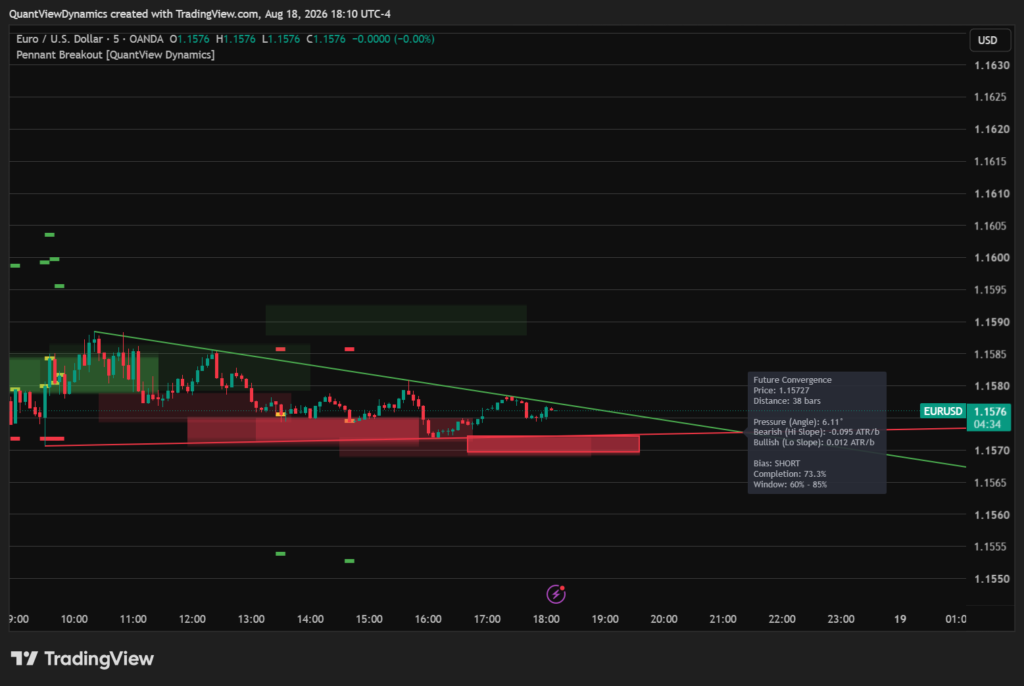
- Convergence Verification: Projects dynamic resistance and support trendlines to calculate the future coordinate intersection (P_x, P_y). Valid pennants require the normalized upper slope to converge toward the lower slope before reaching the apex.
2. Directional Pressure & Timing Gating
- Slope Bias Calculation: Normalizes the slope of each boundary against smoothed ATR to determine whether bullish or bearish pressure dominates the formation.
- Window of Opportunity: Breaks pattern progression into percentage completion toward the apex (P_x). It projects a “Ghost Tunnel” and highlights the active trading zone (defaulting between 60% and 85% completion), preventing trades on premature chop or late, exhausted coils.
3. Execution Triggers & Measured Moves
- Breakout Confirmation: Triggers long or short entry signals when a candle closes outside the pennant boundary within the active timing window, provided true range validates volatility expansion.
- Target & Risk Mapping:
- Entry Level: Marked on the breakout bar (
Yellow). - Stop Loss (SL): Placed at the opposing structural swing level (
Red). - Take Profit (TP): Placed at a classical 1:1 measured move calculated from the base height of the pennant (
Green).
Details
Volatility Expansion & ATR Normalization
False breakouts are common when volume dries up. To protect capital against false whipsaws, the breakout engine requires candle True Range to exceed a linear-regression smoothed ATR baseline (ta.linreg(raw\_atr, 10, 0)) multiplied by the user-defined expansion factor.
Real-Time Convergence HUD & Information Label
On the live bar, the indicator projects an analytical dashboard and future convergence label containing:
- Apex Metrics: Anticipated future price (P_y) and bar distance (P_x – \text{bar\_index}).
- Pressure & Angles: Absolute geometric angle degree between converging vectors alongside ATR-normalized slope rates.
- Completion Status: Live percentage completion of the pattern relative to its apex.
Machine Learning & Self-Tuning Capabilities (Premium Version)
When using the premium version, additional settings include:
- Adaptive Hill-Climber Engine: Dynamically adapts lookback periods and timing window boundaries up or down based on the rolling R-multiple performance of resolved trades.
- k-NN Distance Classifier: Records winning trade feature vectors (slope angles and lookbacks) into memory, filtering out prospective breakout signals if their Euclidean distance exceeds the maximum threshold.
- Performance HUD Table: Displays active parameters, win rate, historical trade samples, and net cumulative R returns in real time.
Settings
Base Settings (Always Available)
- Pivot Legs (Left & Right): Number of bars on either side required to confirm a structural swing high or swing low (Default:
5).
Volatility Settings
- ATR Length: Lookback period for underlying ATR calculation (Default:
14). - Enable Volatility Expansion Filter: Restricts breakout signals to candles whose True Range expands beyond the smoothed ATR baseline (Default:
true). - Volatility Expansion Multiplier: Multiplier applied to smoothed ATR to set the minimum candle range required for entry validation (Default:
1.0).
Standard (Non-AI) Mode Settings
- Short Window Lookback: Lookback period for identifying recent swing anchors (Default:
30). - Long Window Lookback: Lookback period for identifying older base anchors (Default:
150). - Trading Zone Lower Boundary (Min %): Minimum pattern completion threshold required to enter the execution window (Default:
0.60/60%). - Trading Zone Upper Boundary (Max %): Maximum pattern completion threshold before a setup is deemed exhausted (Default:
0.85/85%).
AI / Self-Tuning Mode Settings (Premium Version)
- Enable Self-Tuning Optimization: Activates autonomous parameter adjustment based on trade resolution feedback.
- Short/Long Lookback Bounds & Steps: Configurable search intervals (Min, Max, and Step) for adaptive anchor lookbacks.
- Timing Window Bounds: Custom lower and upper percentage limits for self-tuning the active execution zone.
- Enable k-NN Distance Filter: Enforces machine learning validation against stored winning trade geometry.
- Historical Memory Size: Number of winning feature vectors retained for nearest-neighbor distance calculations (Default:
30). - Max Euclidean Distance Threshold: Distance threshold above which outlier setups are filtered out (Default:
2.5). - Show Self-Tuning HUD & Position: Controls the display and chart corner placement of the real-time AI performance table.
Summary
The Pennant Breakout indicator delivers a complete quantitative framework for breakout traders. By removing subjective discretionary trendlines and pairing mathematical apex calculations with ATR-based volatility validation, it isolates high-momentum continuation moves while actively filtering out choppy consolidation.